

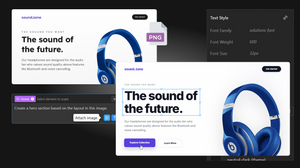
Creating websites used to involve multiple tools, lengthy handoffs, and countless hours translating visual designs into production-ready code. Today, AI is changing that process.
Design-to-code technology enables designers, developers, marketers, and agencies to transform screenshots, mockups, sketches, and UI references into editable website layouts within minutes instead of hours.
Whether you're starting from a Figma design, a whiteboard sketch, or a screenshot of a website that inspires you, AI can generate a responsive starting point that dramatically speeds up development while keeping you in full control of the final result.
In this guide, you'll learn how AI Design to Code works, why it has become an essential part of modern web development, and how you can use TeleportHQ to turn visual ideas into responsive websites faster than ever.
What Is AI Design to Code?
AI Design to Code is the process of using artificial intelligence to analyze an image, identify its visual structure, and generate an editable website layout based on what it sees.
Instead of manually recreating every section, component, spacing rule, and typography style, the AI interprets the design and produces a structured layout that you can immediately customize.
Modern AI models can recognize page sections, navigation menus, hero areas. cards and grids, buttons, forms, images and media placement, typography hierarchy, layout spacing or responsive structures.
Rather than replacing designers or developers, AI removes repetitive implementation work so teams can spend more time improving user experience and functionality.
Why Traditional Design-to-Development Workflows Are Slow
For many teams, a website project still follows a familiar pattern:
- Create a wireframe
- Design high-fidelity mockups
- Hand everything to developers
- Rebuild every component manually
- Test responsiveness
- Refine spacing and styling
- Repeat revisions
Even small marketing websites can require dozens of hours recreating layouts that already exist visually.
This manual process often introduces slower delivery times, inconsistent spacing, communication gaps, multiple review cycles and duplicate work.
AI significantly reduces this overhead by generating an editable first version almost instantly.
How AI Converts Images into Responsive Layouts
Although every platform uses different models, the overall process is remarkably straightforward.
1. Analyze the Visual Structure
The AI first detects major sections of the page.
It distinguishes between navigation, hero sections, feature grids, testimonials, pricing tables, call-to-actions, and footers.
Instead of seeing pixels, it begins understanding the page as reusable interface components.
2. Identify UI Elements
Next, the AI recognizes common interface elements such as buttons, cards, icons, headlines, images, forms, lists or containers.
These become editable building blocks rather than flattened graphics.
3. Generate Responsive Layouts
The AI organizes those elements into a responsive page structure that adapts across desktop, tablet, and mobile devices.
Instead of producing a static recreation, it creates layouts that are easier to maintain and customize.
4. Prepare the Layout for Editing
The generated page can then be refined inside a visual editor.
Developers and designers can adjust spacing, colors, typography, sections, interactions, and content without rebuilding everything from scratch.
What Types of Images Can You Convert?
One of the biggest advantages of modern AI Design to Code tools is flexibility.
You are not limited to polished design files. Common starting points include:
Website Screenshots. Perfect for recreating layouts as editable starting points.
UI Mockups. High-fidelity concepts from design software can quickly become working layouts.
Landing Page References. Collect inspiration from different websites and generate a starting point for your own unique design.
Hand-Drawn Wireframes. Even rough sketches can provide enough structure for AI to generate usable layouts.
Marketing Concepts. Turn visual ideas into interactive prototypes before development begins.
Why Designers and Developers Are Adopting AI
AI Design to Code isn't about replacing creativity.
It's about accelerating implementation. Benefits include:
Faster Prototyping. Generate multiple concepts in minutes instead of hours.
Reduced Repetitive Work. Skip rebuilding standard UI patterns repeatedly.
Better Collaboration. Designers, marketers, and developers can iterate on the same editable project earlier in the process.
Faster Client Feedback. Instead of static mockups, stakeholders can review interactive layouts.
More Time for High-Value Work. Focus on accessibility, interactions, animations, user experience, and business logic instead of recreating layouts.
Design to Code with TeleportHQ
TeleportHQ makes it easy to transform visual references into editable website layouts using AI.
Simply upload an image of a website, interface, or UI component, describe what you'd like to generate, and let the AI create a responsive starting point.
Unlike static image conversion tools, the generated layout remains fully editable inside the TeleportHQ visual builder. You can edit every section visually, replace content, modify colors and typography using tokens, rearrange reusable components, continue refining layouts with AI prompts and expand the page into a complete website.
Whether you're creating a landing page, dashboard, marketing website, or internal application, TeleportHQ helps shorten the journey from inspiration to production.
👉 Learn more about TeleportHQ's Design to Code feature.
Best Practices for Better AI Results
The quality of your starting image has a direct impact on the generated layout.
For the best results:
Work section by section. Upload only one section of the page at a time. Avoid giving the AI a context that may be too detailed.
Use High-Resolution Images. Clear screenshots help the AI identify individual components accurately.
Focus on Complete Sections. Uploading entire page sections provides more context than isolated elements.
Avoid Busy Backgrounds. Clean interfaces are easier to interpret. If background are too complicated they will be generated as code, not images.
Add Helpful Instructions.
Combine the image with prompts such as recreate this landing page, generate responsive layout, modernize this interface, use rounded buttons, improve spacing, update the design system based on this image.
The more context you provide, the better the output.
AI Doesn't Replace Creativity
One common misconception is that Design to Code produces finished websites automatically. In reality, AI provides an intelligent starting point.
Human expertise still matters for branding, UX decisions, accessibility, content strategy, performance optimization, SEO or business logic.
Think of AI as a productivity multiplier rather than an automatic website generator.
Common Use Cases
Organizations are using AI Design to Code across many different workflows.
Marketing Teams. Launch campaign landing pages faster.
Agencies. Reduce production time for client websites.
Product Teams. Prototype interfaces before development.
Startups. Validate ideas without investing weeks in front-end implementation.
Developers. Skip repetitive layout creation and focus on functionality.
Frequently Asked Questions
Can AI convert any image into code?
AI works best with clear interface designs, website screenshots, mockups, and wireframes. Complex illustrations or artistic images may require additional refinement.
Does AI generate responsive layouts?
Modern Design-to-Code tools generate layouts that are intended to adapt across multiple screen sizes, making them much easier to customize than static recreations.
Can I edit the generated website?
Yes. The generated layout serves as a starting point and can be customized, expanded, or redesigned inside the editor.
Is Design to Code only for developers?
No. Designers, marketers, founders, agencies, and product managers can all benefit from AI-assisted layout generation.
Can I use website screenshots as inspiration?
Yes, using screenshots as inspiration is a common workflow. However, you should avoid copying copyrighted branding, imagery, or proprietary content. Instead, use AI-generated layouts as a foundation for creating original designs.
The Future of Website Creation Is Faster
AI is fundamentally changing how websites are designed and built.
Instead of spending hours recreating layouts manually, teams can generate responsive foundations within minutes, iterate more quickly, and focus on creating better digital experiences.
Design-to-Code technology is becoming an essential part of modern web development—not because it replaces designers or developers, but because it eliminates repetitive work and accelerates every stage of the design process.
If you're looking for a faster way to transform screenshots, mockups, or UI concepts into editable websites, TeleportHQ provides an AI-powered workflow that helps you move from visual inspiration to production-ready layouts with significantly less effort.