

One of the biggest misconceptions in web development is that redesigning a website means starting from scratch. It doesn't.
One of the biggest misconceptions in web development is that redesigning a website means starting from scratch.
It doesn't.
Whether you're updating a marketing website, refreshing a client project, or modernizing a legacy HTML site, rebuilding everything from the ground up is often the most expensive and time-consuming approach.
The structure already exists. The content is written. The navigation has been planned. The layouts have been tested.
So why throw all of that work away?
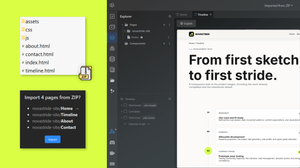
Instead, you can import your existing HTML, CSS, and JavaScript into TeleportHQ, continue editing your website visually in the editor, and use AI to speed up future improvements without sacrificing the work you've already completed.
In this article, we'll explore why rebuilding is rarely necessary, when importing existing websites makes more sense, and how TeleportHQ helps developers and teams modernize websites without starting over.
Why Rebuilding Websites Is Often a Mistake
Every website is an investment. Hours are spent designing layouts, writing content, building responsive pages, testing functionality, and refining user experience.
Yet many redesign projects begin with an empty project and that usually leads to unnecessary work. Instead of improving an existing website, teams end up recreating navigation, rebuilding layouts, rewriting styles, and copying content that already exists.
Starting from scratch can introduce longer development cycles, higher project costs, increased risk of inconsistencies, lost design decisions, more QA time and delayed launches.
Unless you're replacing your entire product or completely changing your brand, most of your website can continue evolving instead of being recreated.
Your Existing HTML Already Has Value
Many developers underestimate how much value exists in an older website.
Even if the design feels outdated, your project already contains responsive layouts, navigation structures, page hierarchy, content organization, forms, buttons, reusable sections, SEO metadata and internal links.
These aren't things you want to rebuild every time your website evolves, but assets you can continue improving.
Think of your HTML as the foundation of a house.
You can renovate the interior, modernize the exterior, and add new rooms without demolishing the building.
When Importing Makes More Sense Than Rebuilding
Importing existing code isn't the right choice for every project.
But for many websites, it's the fastest path to a modern editing workflow.
Importing is particularly useful in the following scenarios.
1. Updating a Business Website
Your website works but it simply needs refreshed visuals, new content, or additional pages.
2. Refreshing a Landing Page
Successful landing pages often evolve through continuous optimization. There's no reason to recreate layouts that already convert well.
3. Taking Over a Client Project
Agencies frequently inherit existing websites. Importing the project provides a much faster starting point than rebuilding every section manually.
4. Modernizing Legacy HTML
Older websites may have outdated styling while still containing valuable content and structure. Importing lets you modernize without losing years of work.
5. Continuing Internal Projects
Company portals, documentation websites, and internal tools often need regular improvements. Importing existing projects allows teams to continue development without disrupting ongoing work.
What Happens After You Import Your Website?
Importing HTML isn't simply about moving files into another platform.
It's about unlocking a more flexible workflow.
Once your website has been imported into TeleportHQ, you can continue improving it using visual editing, AI-powered features, and collaborative tools.
Instead of repeatedly editing source files, your team can focus on making meaningful improvements.
Typical workflows include:
- Updating layouts,
- Replacing content,
- Improving responsive design,
- Creating additional pages,
- Reorganizing sections,
- Refreshing branding,
- Building new components,
- Expanding the website over time.
The website you've already built becomes the starting point for everything that comes next.
Modernize Without Losing Your Work
Many redesign projects fail because they try to replace everything at once.
A better strategy is gradual modernization.
Import your website first, then improve it one section at a time.
This approach reduces risk while allowing continuous improvements.
For example, you might refresh your homepage, update typography, improve mobile layouts, replace outdated imagery, add new landing pages, introduce modern components, improve accessibility and optimize calls-to-action.
Small improvements accumulate into a significantly better website without requiring a complete rebuild.
Import HTML into TeleportHQ
TeleportHQ helps you continue developing the websites you've already built.
Instead of forcing you to start with a blank project, TeleportHQ lets you import your HTML, CSS, and JavaScript into an editable visual environment.
After importing, you can edit layouts visually, continue working with existing code, rearrange sections, update styling, improve responsiveness, build additional pages, collaborate with teammates and speed up future edits using AI.
Rather than replacing your workflow, TeleportHQ extends it.
Your previous work becomes the foundation for your next iteration.
Ready to modernize your existing website?
Explore the HTML to Website Converter and discover how you can import your existing HTML, CSS, and JavaScript into an editable TeleportHQ project.
Check out the HTML to Website ConverterIf you'd like detailed instructions, supported project structures, and current limitations, the TeleportHQ Help Center includes a complete implementation guide. Just go to: https://help.teleporthq.io/en/article/how-to-import-html-code-to-teleporthq-67xz31/
Who Benefits Most from HTML Import?
Almost every type of web team can benefit from importing existing websites.
1. Agencies
Reduce the time required to onboard inherited client projects.
2. Freelancers
Reuse previous work instead of rebuilding familiar layouts.
3. Startups
Modernize early MVP websites while keeping development focused on product features.
4. Marketing Teams
Continue improving campaign websites without waiting for every content change to go through development.
5. Developers
Spend less time recreating layouts and more time building functionality.
6. Enterprises
Extend the lifespan of legacy websites while transitioning to more collaborative workflows.
Frequently Asked Questions
Do I need to rebuild my website before importing it?
No.
HTML import is specifically designed to eliminate unnecessary rebuilding.
Can I continue editing my website after importing it?
Yes.
Imported websites become editable projects that you can continue improving over time.
Is HTML import useful for redesign projects?
Absolutely.
Many redesigns only require modernizing layouts rather than replacing entire websites.
Can agencies import client websites?
Yes.
Importing inherited projects significantly reduces onboarding time and accelerates redesign work.
Can I continue using code after importing?
Yes.
Importing doesn't prevent future development.
It simply provides a more flexible editing workflow.
Where can I learn about supported file structures and limitations?
For detailed technical documentation, visit the TeleportHQ Help Center:
How to Import HTML Code into TeleportHQ
https://help.teleporthq.io/en/article/how-to-import-html-code-to-teleporthq-67xz31/
Stop Starting Over
Great websites aren't built once. They're improved continuously.
Every redesign, optimization, campaign, and feature release builds on work that's already been completed.
Instead of throwing away months or years of development, import your existing HTML into TeleportHQ and continue evolving your website inside a modern visual editing environment.
By preserving your existing code while embracing visual editing and AI-powered improvements, you can reduce development time, simplify collaboration, and modernize websites without sacrificing everything you've already built.