

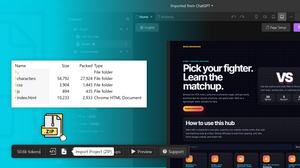
Not every website starts from a blank canvas.
Many businesses already have an existing website built with HTML, CSS, and JavaScript. Developers have landing pages they've coded from scratch, agencies inherit client websites, and designers often receive exported HTML prototypes that need further refinement.
The challenge is that once a project exists as static code, making ongoing changes can become slow and repetitive. Even simple updates may require editing multiple files, manually adjusting layouts, or involving developers for tasks that could otherwise be handled visually.
Modern AI website builders offer a better approach.
Instead of rebuilding your website from scratch, you can import your existing HTML, CSS, and JavaScript into a visual editor, continue developing the project, and use AI to accelerate future updates.
In this guide, you'll learn how HTML import works, why it's valuable, and how TeleportHQ helps transform existing code into an editable website that evolves with your project.
Why Import HTML Instead of Starting Over?
Rebuilding an existing website is rarely the most efficient option.
Whether you've inherited an older project, developed a custom marketing website, or maintain a collection of static HTML pages, your existing code represents valuable work that shouldn't be discarded.
Importing HTML allows you to preserve that investment while gaining access to a faster, more collaborative workflow.
Instead of recreating layouts, copying content, and rewriting styles, you begin with the website you've already built and continue improving it inside a modern visual editing environment.
Common reasons people import HTML include:
- Modernizing legacy websites
- Updating existing landing pages
- Continuing client projects
- Improving responsive layouts
- Collaborating with marketers and designers
- Accelerating redesigns
- Preparing websites for long-term maintenance
Rather than rebuilding from scratch, HTML import lets you build on what already works.
The Problem with Static HTML Websites
HTML websites remain one of the fastest and most flexible ways to build for the web.
However, as projects grow, maintaining them manually often becomes increasingly time-consuming.
A simple content update might require opening multiple files, editing CSS styles, checking responsive layouts, and testing changes across browsers.
Over time, teams frequently encounter:
- Multiple interconnected HTML files
- Large CSS codebases
- Repeated content edits
- Manual layout adjustments
- Slower review cycles
- Developer bottlenecks
- Limited collaboration with non-technical teams
For websites that evolve regularly, these repetitive tasks gradually consume more development time than creating new features.
What Happens During HTML Import?
When you import your project into TeleportHQ, the platform analyzes your website and reconstructs it as an editable project inside the visual editor.
Instead of treating your website as a collection of static files, TeleportHQ converts it into a project that you can continue building, reorganizing, and refining over time.
Depending on the project, imported assets will include HTML structure, CSS styling, JavaScript functionality, images, navigation, layout hierarchy, content sections and interactive elements.
Once the import is complete, you can immediately begin making visual edits while continuing to extend your website with additional pages, components, AI-assisted changes, or custom code.
The result is a project that's much easier to maintain while preserving the work you've already completed.
If you're looking for technical details, including supported project structures, file requirements, and current limitations you can also follow the complete step-by-step documentation in the TeleportHQ Help Center:
https://help.teleporthq.io/en/article/how-to-import-html-code-to-teleporthq-67xz31/
What Happens After Importing Your Code?
Importing your HTML isn't the end of the process, it's the beginning of a much more flexible workflow.
Once your website has been imported, you can continue improving it without rebuilding everything from scratch.
Some of the most common next steps include:
Visual Editing. Modify layouts without manually rewriting HTML every time a design changes.
Updating Content. Replace headlines, buttons, images, and sections much faster than editing multiple source files.
Improving Responsive Layouts. Fine-tune spacing, alignment, and layouts across desktop, tablet, and mobile devices.
Modernizing Older Designs. Refresh outdated websites while preserving the content and structure you've already created.
Continuing Development. Developers can continue extending the project instead of abandoning previous work and starting over.
Why HTML Import Is Valuable for Developers
Developers often avoid traditional website builders because they don't want to lose control over their projects.
Modern website builders have changed that.
Instead of replacing development workflows, HTML import complements them.
Importing existing code allows developers to preserve previous work, prototype faster, collaborate with designers, enable marketing teams to make content updates, continue iterating without rebuilding projects and spend more time on functionality instead of repetitive layout changes.
Rather than choosing between coding and visual editing, developers can benefit from both.
Why Agencies Love HTML Import
Agencies regularly receive projects in many different formats.
A client might provide a static HTML website, marketing landing page, microsite, exported project or an older website requiring modernization.
Rebuilding these websites from scratch consumes valuable time and budget.
Instead, agencies can import existing websites into TeleportHQ, preserve the foundation, and immediately begin improving layouts, content, responsiveness, and user experience.
This significantly shortens production timelines while making future maintenance much easier for both developers and marketing teams.
Import HTML, CSS & JavaScript with TeleportHQ
TeleportHQ makes it easy to continue working with websites you've already built.
Using the HTML Import feature, you can upload your a ZIP file comprised of all of your existing HTML, CSS, and JavaScript files, convert them into an editable TeleportHQ project, and continue developing your website inside the visual editor.
Once imported, you can edit layouts visually, update content quickly, modify styling, rearrange sections, continue building additional pages, improve responsiveness, collaborate with your team and accelerate updates with AI-powered editing tools.
Instead of abandoning previous work, TeleportHQ helps you build on the investment you've already made.
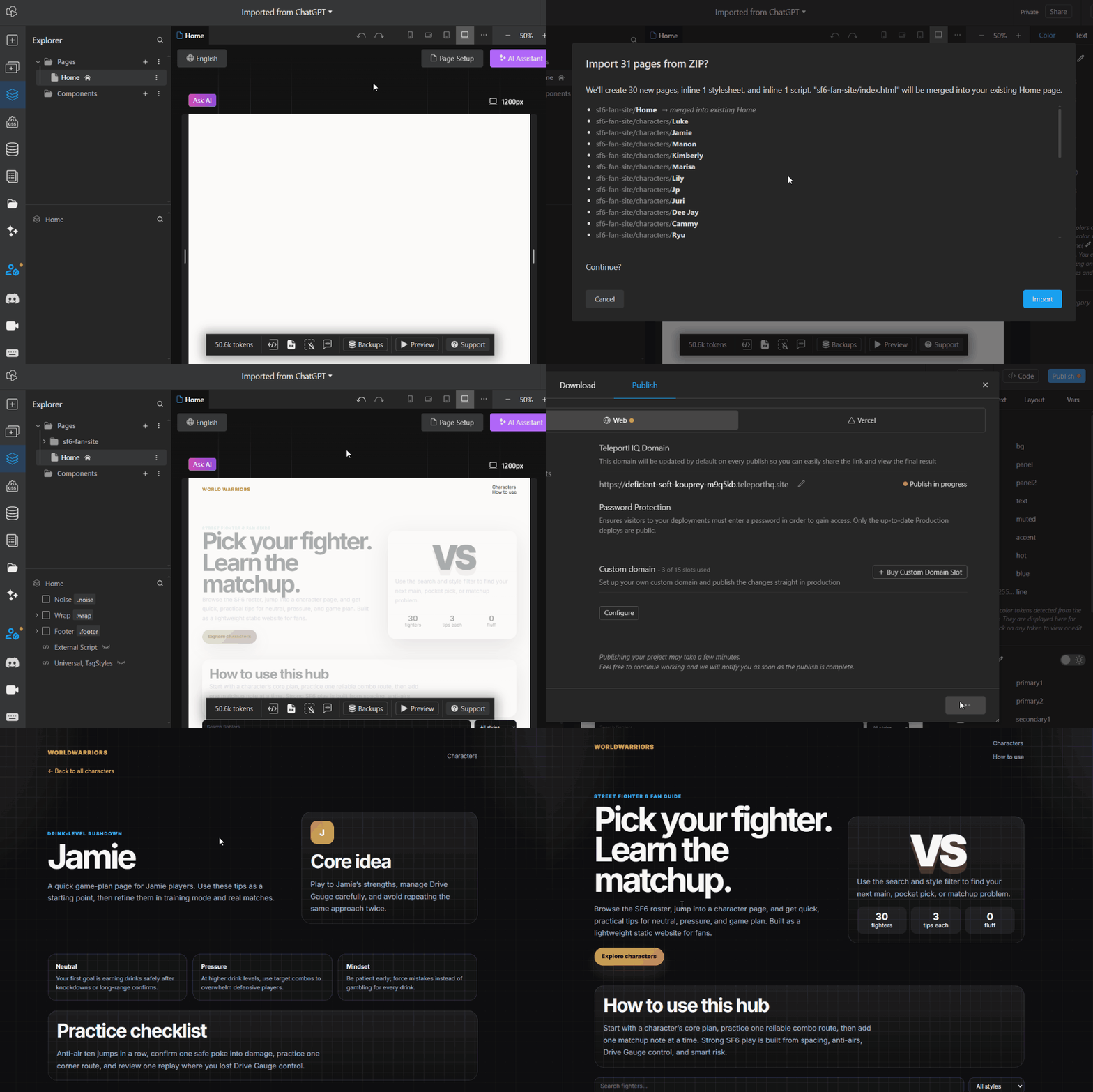
In the example below, we asked ChatGPT to generate an entire website and save it as a ZIP file. We then uploaded it as it was into TeleportHQ and published it. The result was a working website that can easily be edited and built upon.
Why Combine HTML Import with AI?
Importing your HTML is only the first step.
Once your project has been converted into an editable TeleportHQ project, The AI Assistant can help accelerate future improvements.
Instead of manually editing every section, you can use AI to generate new layouts, rewrite website copy, update visual styles, improve spacing and alignment, create additional page sections, expand existing pages or build new pages that match your current design.
This combination of imported code, visual editing, and AI assistance allows teams to iterate much faster than traditional HTML workflows.
Rather than replacing developers, AI becomes another productivity tool that reduces repetitive work while preserving full creative control.
Best Practices Before Importing HTML
Preparing your project before importing it will help ensure the best possible results and reduce the amount of cleanup required afterward.
While TeleportHQ is designed to simplify the transition from static code to an editable project, spending a few minutes organizing your files can make the import process smoother.
Organize Your Project Structure. Store your HTML, CSS, JavaScript, images, fonts, and other assets in a clear folder structure. A well-organized project makes it easier for the import process to identify and preserve relationships between files.
Remove Unused Code. Legacy projects often contain CSS rules, JavaScript libraries, or HTML sections that are no longer used. Cleaning up unnecessary code before importing helps reduce complexity and makes future maintenance easier.
Verify Asset Paths. Before importing, check that your project correctly references images, icons, fonts, CSS files, JavaScript files. Broken paths can lead to missing assets after import.
Test Your Website First. Importing a working project is always preferable to importing one that's already experiencing layout or functionality issues. Testing beforehand ensures you're bringing a stable foundation into your new workflow.
Keep a Backup. Although importing doesn't overwrite your original project, it's always good practice to keep a backup of your source files before making major workflow changes.
What Types of HTML Projects Can You Import?
HTML import isn't limited to one type of website.
Whether your project was built years ago or only recently completed, importing existing code allows you to continue developing it inside a visual editing environment.
Here are some of the most common projects users import into TeleportHQ.
Landing Pages. Marketing teams often create landing pages that evolve over time. Instead of rebuilding successful campaigns from scratch, you can import the existing page, update messaging, improve layouts, and continue optimizing conversions.
Business Websites. Many businesses still operate websites built with traditional HTML and CSS. Importing these projects makes it easier to refresh designs, update content, and collaborate with teams without replacing the entire website.
Portfolio Websites. Designers, developers, and freelancers can modernize portfolio websites while preserving years of previous work. Rather than rebuilding every project page, simply import the existing website and continue improving it.
Documentation Websites. Technical documentation often begins as static HTML. Importing documentation websites into TeleportHQ allows teams to reorganize content, improve navigation, and maintain documentation more efficiently.
Product Microsites. Marketing campaigns frequently require updates long after launch. Importing promotional websites makes it easier to publish new sections, update content, and extend campaigns without starting over.
Legacy Websites. Older HTML websites often contain valuable content but outdated layouts. Importing them provides an opportunity to modernize the user experience while preserving the existing website structure.
Agency Client Projects. Agencies regularly inherit websites from clients. Instead of recreating every page manually, HTML import provides a much faster starting point for redesigns, maintenance, and ongoing collaboration.
Common Use Cases
HTML import supports many different workflows across agencies, startups, enterprises, and individual developers.
Some of the most common use cases include:
Website Redesigns. Import your current website, modernize the design, and continue iterating without rebuilding everything.
Marketing Website Updates. Keep campaign websites fresh by updating layouts, CTAs, and messaging through visual editing.
Client Website Migration. Move existing client projects into a collaborative environment that's easier to maintain over time.
Internal Company Websites. Modernize portals, documentation, knowledge bases, and internal tools while preserving existing HTML.
Product Launches. Use existing landing pages as a foundation for launching new products, services, or feature announcements.
Rapid Prototyping. Developers can import coded prototypes and quickly transform them into collaborative projects that evolve alongside product development.
Frequently Asked Questions
Can I import HTML, CSS, and JavaScript together?
Yes. TeleportHQ allows you to import HTML together with its associated CSS and JavaScript files, making it possible to continue developing an existing website instead of rebuilding it.
Do I need to recreate my website before importing?
No.
The purpose of HTML import is to reuse the work you've already completed and transform it into an editable project.
Can I edit my website after importing it?
Absolutely.
Once imported, your project can continue evolving through visual editing, AI-assisted workflows, and additional development.
Is HTML import only useful for developers?
Not at all.
While developers benefit from preserving their existing code, agencies, designers, marketers, startups, and businesses can also use HTML import to modernize websites and collaborate more effectively.
Can I import older websites?
Yes.
HTML import is particularly valuable for modernizing legacy websites that would otherwise require significant redevelopment effort.
Future-Proof Your Existing Websites
Your existing HTML website already represents an investment of time, expertise, and effort.
Whether it was built last month or several years ago, there's no reason to abandon that work simply because your workflow has evolved.
HTML import gives you the flexibility to preserve what already works while unlocking a faster, more collaborative way to build websites.
Instead of manually recreating layouts, copying content, or restructuring entire projects, you can import your existing website into TeleportHQ and continue developing it inside a visual editor enhanced with AI-powered tools.
This approach allows developers to remain productive, marketers to update content more independently, and agencies to deliver projects faster without sacrificing flexibility.
As AI continues transforming web development, the ability to combine existing code with modern visual editing workflows will become increasingly valuable.
TeleportHQ helps bridge that gap by turning static HTML projects into editable websites that can grow alongside your business.